Good afternoon, everyone.
Today is a good day to mention holiday scams since this week starts the major online holiday shopping activities. I also want to let you know about an email that came out today that is legitimate.
Sometimes I think it’s best to repeat things a few extra times, so I am reminding everyone of the UT systemwide phishing simulation campaign, as well as including those easy instructions so you can update Office to the required Microsoft 365 Apps for Enterprise without needing to call the OIT HelpDesk.
Please don’t forget about the annual compliance training, which includes the Cybersecurity Awareness training. Keep in mind there will be an automated disablement of NetIDs for anyone who does not complete the training by the 12/31/2026 deadline.
Current Threats
- Holiday Scams
- ‘Tis the season to be extra cautious when it comes to emails, texts, ads, websites, etc.
- Every year before Black Friday things get a lot scarier when it comes to fraud but always keep in mind that if it seems too good to be true, it almost certainly is!
- Here are some of the usual scams:
- Phishing attempts
- Never click on anything you are not 100% certain is legitimate.
- Never reply to an email that you are not 100% certain is legitimate.
- Fake ads
- Never click on an ad in social media.
- Instead, go to the retailer’s known site and see what specials they really have.
- Fake online stores
- Never click on a link that appears to be for a legitimate retailer without either hovering over it to make sure the address makes sense, copying and pasting the link, or better yet manually typing in the known address of the retailer.
- Fake delivery notifications
- Never click on the link for a delivery notification, especially one claiming that your delivery has been delayed.
- Manually type the known site where you made the purchase or go directly to the carrier’s known site to track your order.
- Charity scams
- Don’t click on links for charitable donations because the charity may be fake or an impersonation.
- If you get a text or email about donating, research the charity to be sure it is legitimate and type in the known address once you have verified.
- Phishing attempts
- If you think you are a victim of a scam, please report it as soon as you can to your bank, credit card company, etc.
- Call local law enforcement to report the crime.
- Report fraud to the Federal Trade Commission.
- If your personal information was lost, stolen, or part of a data breach go to IdentityTheft.gov to find out what you need to do.
Current Non-Threat
- UTIA Websites (email)
- The sender is UTIA Information Technology Services.
- The subject is Access Issues with UTIA Websites.
- If you are a WebManager for a UTIA site, please know that you may receive this message twice, as it was sent to two different UTIA groups.
- This email lets you know that some users are unable to access UTIA websites and shows the message those users will see.
- The message lets you know how to find your IP address so that you can work with UTIA ITS if you are experiencing this issue.
Important Information
- Phishing Simulations (reminder)
- UT is now officially doing phishing simulations systemwide.
- The plan is to send a phishing simulation email to every UT email address, including student and departmental email addresses, every two weeks and will be sent on varying days of that particular week.
- The hope is to change that to random groups of recipients like UTK has done in the recent past but that won’t happen until early next year.
- There are 85 different phishing simulation email templates and not everyone receives the same email nor on the same day, and I have no idea which templates are being used and when.
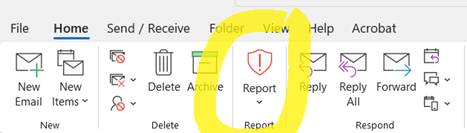
- The key here is to use the red Report button on the upper left corner of your Outlook ribbon and choose “Report Phishing” each and every time you get one of these emails. (If you are still using any version of Office other than the Microsoft 365 Apps for Enterprise version, please see installation instructions below).
- The Report button looks like this:
- OIT no longer wants anyone to forward to OIT Abuse because that is no longer monitored, so the reporting, even for actual phishing emails, will not be documented properly.
- I know that a lot of people do not like getting phishing simulations, but they are used as a security awareness tool to help users recognize real attacks, build habitual awareness, and reduce real incident likelihood.
- Please think of these as regular training sessions that take only a couple of minutes to complete and the email templates stay updated to align with current strategies used by the real scammers.
- Updating to Microsoft 365 Apps for Enterprise (reminder)
- For those who still have an older version of Office (Outlook) as mentioned in many of the past newsletters, I have some instructions for you that are easy to follow so you can get updated as soon as possible.
- Click on the Orange UTIA icon located in the system tray (lower right).
- Select “Self Service Portal”.
- A window will pop up and there are only two choices. Click the Install button on “UTIA & CVM Office 365”, which will uninstall any older versions and install the latest MS 365 software.
- If at any time in the future you have Office issues, come back to the portal and there is a Re-Install button, which may fix a lot of issues without having to call the OIT HelpDesk.
- Cybersecurity Awareness Training (reminder)
- Please take some time to complete your 2026-2027 UTK Compliance Training if you haven’t already.
- This package includes the various annual required compliance modules, such as Title VI, Title IX, and Emergency Preparedness, as well as Cybersecurity Awareness.
- The deadline for completing this training is 12/31/2026, but please do not wait until the last minute to complete it because things get hectic with holidays, time off, and end-of-the year activities.
- I should add that if you are a retiree, you most likely were not assigned the training, as typically only those in a paid post-retirement position will get the assignment.
- You will get reminders if you were assigned the training but have not completed it.
- For the past several years users who did not complete the security awareness training by the deadline had their NetIDs disabled, losing access to anything requiring the NetID and password for authentication, including email, Teams, OneDrive, DASH, and Canvas.
- This was a manual process, and users would have to call the HelpDesk to have their accounts enabled in order to complete the training.
- This year the entire UT System will be using a disablement process, but it will now be automated and has a few differences, some being a bit more problematic.
- If the training is not completed by 12/31/2026, the automation process will begin, but it is not exactly clear when the accounts will become disabled, meaning that you could have access when you return on or after 01/04/2027 but could lose access shortly thereafter.
- When your account has been disabled and you try to log into something such as email, you will get a notification saying that your NetID has been disabled and that you must log into K@TE to complete the training to have that NetID reenabled.
- Once you complete the training, the automation process starts the enablement, but it may take as long as two to three hours to fully enable.
- Please keep in mind that every new process may experience some unexpected bumps, so I highly recommend that you complete the training before the 12/31/2026 deadline to avoid any potential issues.
I am so thankful for each and every one of you! If you ever have any questions, concerns, or issues, please do not hesitate to let me know!
Please have a wonderfully Happy Thanksgiving!
Sandy
Important Note: Thank you so much for sharing these e-newsletters with family, friends, clients, students, and anyone else who may benefit from the information. I would like to stress that you should keep your students in mind, as non-employee students will not get this information without someone sharing. If anyone has an email group for students who are not employees of your department, please let me know what that address is, and I can include it. I do this as a blind copy so student names and addresses will not show up!